What becomes slow
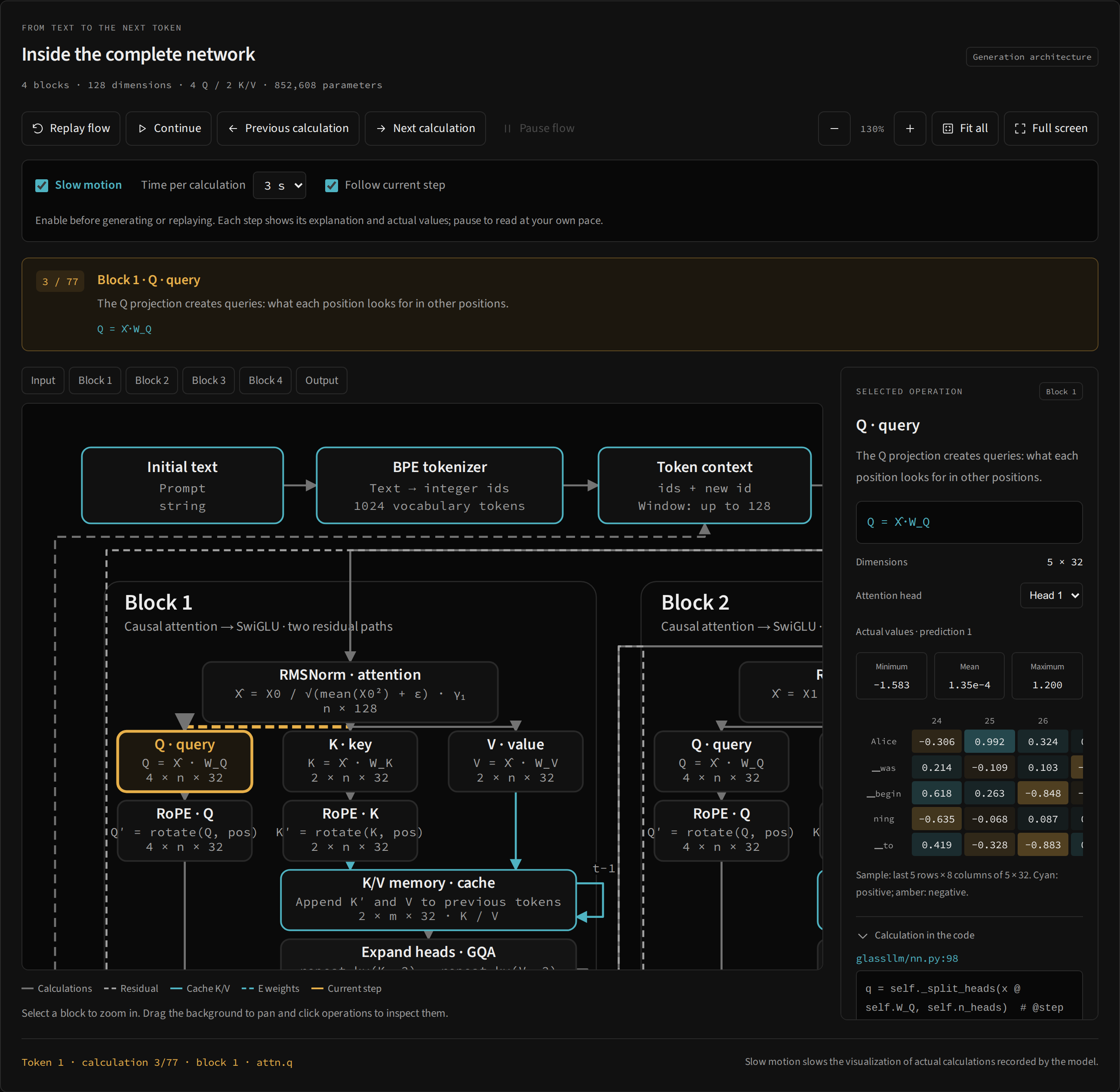
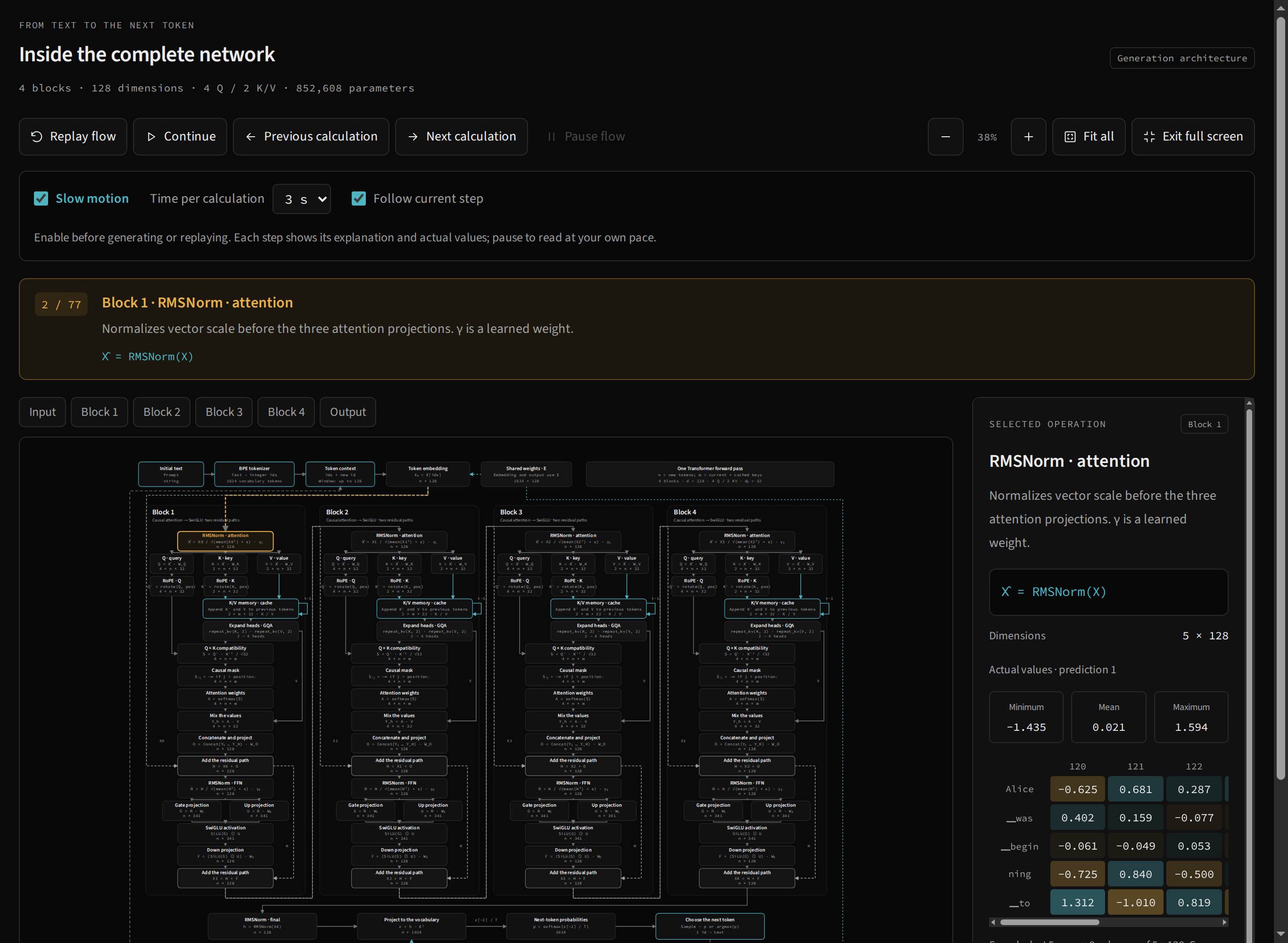
The engine first computes the prediction and records result snapshots. Slow motion replays these records in order, giving you time to read each operation. Selection, explanation, equation, tensor and diagram highlight all follow the same event.
It does not execute a NumPy multiplication gradually or pause Python midway through a function. The selected token is already known when playback begins and may already appear in the output. Going back one visual step does not undo generation or recalculate weights.
Prepare a reading session
- Open the lab and choose Most likely.
- Go to the architecture and enable Slow motion before generating or replaying.
- Choose Time per calculation: 1, 2, 3, 5 or 8 seconds. The default is 3 seconds.
- Keep Follow current step enabled so the map locates each operation.
- Use Step once for one prediction or Generate to continue through cycles of calculation and reading.
- Click Pause flow to stabilize the event you want to study.
With four blocks, a prediction has 77 events: one embedding, 72 block operations, final normalization, logits, probabilities and selection. At 3 seconds, the 76 waits in a complete path add up to about 3 minutes 48 seconds, plus inspection and computation time. Choose 1 second for a first tour and increase it to study matrices.
Playback controls
| Control | Effect on the current prediction |
|---|---|
| Replay flow | Restarts the snapshot sequence from the first event. |
| Continue | Resumes playback after the current position. Does not generate another token. |
| Previous calculation | Pauses the flow and selects the previous event. |
| Next calculation | Pauses the flow and selects the following event. |
| Pause flow | Stops playback and continuous generation, retaining the current event. |
| Follow current step | Frames the active operation during slow playback. |
Previous and next respect the trace’s boundaries. Playback controls are disabled before the first prediction. While the engine is computing, actions that depend on the trace also wait for completion.
Pause and resume without skipping the explanation
Pause in the text area stops both continuity and playback. Selecting a node or changing the inspector’s head also stabilizes generation so values do not change while you read.
To continue only the explanation of the current records, use Continue in the architecture. To continue producing text, use Generate: when a flow remains pending, the interface finishes reading that prediction before requesting the next token.
Step once with slow motion also respects a pending flow: it first completes playback of the current prediction. Once it finishes, another click computes the next token. This keeps a study action from silently replacing values before you finish reading them.
A route for studying attention
Pause at Q and read its shape. Advance to K and observe that GQA has fewer K/V heads. At RoPE, compare the shape with the preceding projection. At Scores, check query and key axes. At Mask, find −∞; at Softmax, observe zero weights in blocked positions. At Mix with V, check the return to one head’s dimensions.
The step card shows i / 77, block, title, explanation and equation. The inspector displays values for the selected head. Turn off Follow current step when you want to keep two neighboring regions in view and navigate manually.
Limits on comparison
Only the last prediction’s trace is retained in the worker. Generating another token replaces available snapshots; playback cannot return to earlier tokens in the output. The reading interval does not change probabilities, event order or mathematical results.
The system’s reduced-motion preference shortens ordinary automatic animation. Manual playback and slow motion still let you navigate through events. To understand the numerical sample and nodes without snapshots, continue with the inspector.