Turn logits into probabilities
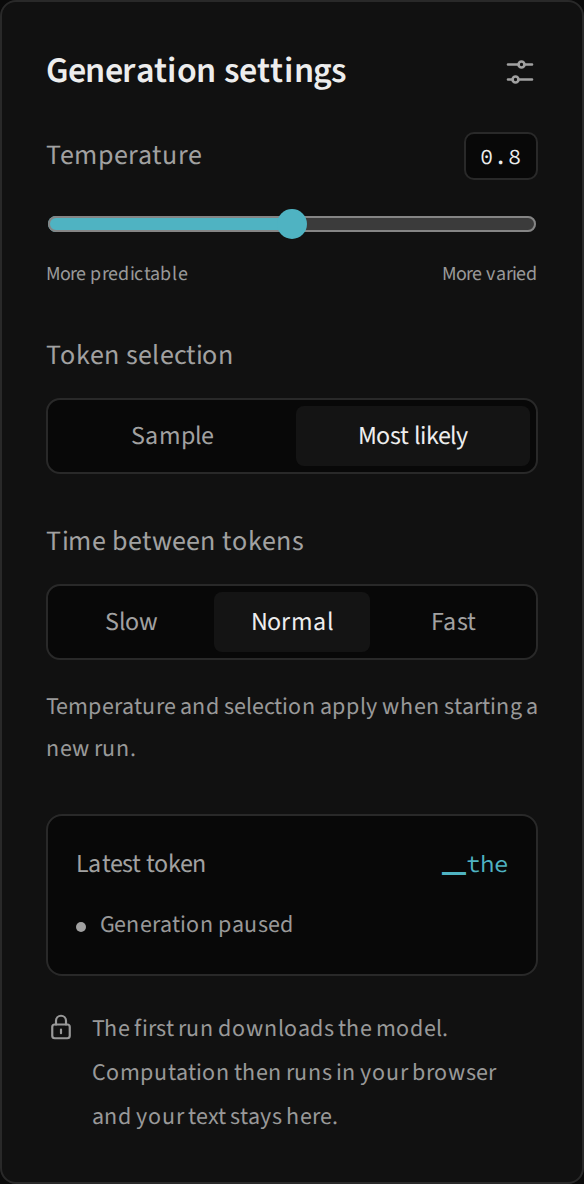
The model produces a logit for every vocabulary ID. Generation uses the distribution p = softmax(logits / T), with positive temperature T. In the lab, the slider ranges from 0.2 to 1.4 in increments of 0.1; its initial value is 0.8.
Lower temperatures concentrate the distribution on larger logits. Higher temperatures spread it out. This changes selection probabilities, but not learned weights, vocabulary or architecture. The library rejects zero or negative temperature; for deterministic selection, use greedy=True in Python or Most likely in the interface.
Sample or choose the largest value
| Option | Next-ID calculation | What to expect |
|---|---|---|
| Sample | Draws according to distribution p |
Identical runs can produce different continuations. |
| Most likely | Takes the index with the largest probability | With the same weights and context, selection is reproducible. |
The interface does not expose a sampling seed field. To reproduce a sampled run in Python, supply seed to GlassLM.generate. Greedy mode does not need a seed to choose its ID.
For the same logits vector and a positive temperature, division by T preserves candidate order. Changing only temperature in greedy mode therefore changes the displayed distribution, but not the largest-value ID. A sampled continuation may change because each ID’s chances change.
When settings take effect
Temperature and selection method are sent to the worker when it creates the run’s generator. Pausing, moving the slider and resuming does not recreate this generator. The panel may display the control’s new position while the existing generator still uses its initial value.
To compare configurations correctly:
- Pause and click Reset.
- Keep the same prefix.
- Select temperature and selection method.
- Use Step once and note the candidate, probability and selected ID.
- Reset and repeat with the other setting.
Do not conclude that the slider is ineffective simply because the greedy selection stayed the same. Compare probabilities and how concentrated the distribution is.
Two different clocks
Time between tokens sets a display wait after a prediction’s flow: Slow, 650 ms; Normal, 300 ms; Fast, 90 ms. The interval is read between advancements and can change during an existing run. It does not change calculation results or guarantee an exact token-per-second rate; computation and animation add to the wait.
Time per calculation belongs to slow motion and offers 1, 2, 3, 5 or 8 seconds between snapshots, with a 3-second default. A 77-event prediction involves 76 waits when fully replayed. This control provides time to read each operation before the next one; it does not define how many tokens the engine computes per second.
Model state and privacy
The panel shows the latest token and reports loading, execution, pause or the run limit. The first use downloads the runtime and wheel. Inference then runs locally in a Web Worker with the NumPy library; the prompt is sent to that worker, not a remote inference API.
If a setting seems ineffective, check that you started a new run. If the interface reports failure, open Technical details and see states and troubleshooting. To interpret the six output bars, continue with attention and probabilities.