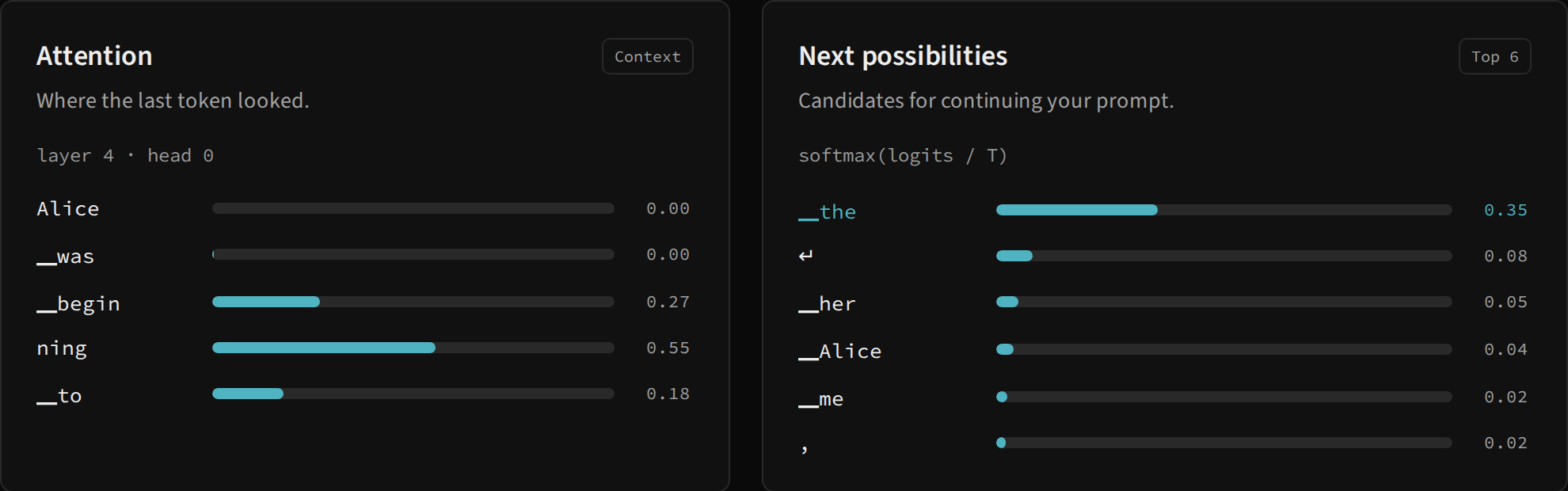
Two spaces of choice
Attention assigns weights to context positions to mix V vectors inside a head. Next possibilities assigns probabilities to vocabulary IDs to choose the next output. Both involve softmax, but their axes, meanings and purposes differ.
| Panel | Bar axis | Value source | Scope |
|---|---|---|---|
| Attention | Tokens present in the prediction’s context | Last row of attn.softmax, block index 3, head index 0 |
One head of the last block |
| Next possibilities | Candidate vocabulary tokens | GenStep.probs |
Six largest values among 1,024 IDs |
Read the attention panel
After a prediction, each row presents a context token, a bar and a weight rounded to two decimal places. Layer 4 · head 0 uses a human-readable layer number and a Python head index. In the complete inspector, the same head appears as Head 1.
The weights describe how the last position’s query mixes values from accessible positions within that head. They sum to approximately 1 before rounding. Values displayed as 0.00 can still be small positive weights; the displayed number does not imply exact zero.
This is a partial view of the calculation. Another head or block may use a different distribution. A large bar does not prove that one token alone determined the selected word: other operations, blocks, residuals and the output projection follow this mixture.
The newly selected token was not yet part of the context for this prediction. It is appended afterwards and influences the following prediction. The panel therefore describes the positions used to choose the continuation, not all the text already updated in the output.
Read the six candidates
The worker sorts the full distribution and displays the six IDs with the highest probability. Bars use the original probability without renormalizing the six values. Adding these six bars therefore normally gives less than 1; the rest belongs to other vocabulary tokens.
Temperature is already applied: values correspond to the run’s softmax(logits / T). In Most likely mode, the largest-value ID is selected. In Sample mode, the selected ID may be outside these six because the draw uses the full distribution.
Labels are BPE forms, not complete words. A ▁the candidate adds the; a fragment such as ning continues a word. Special tokens can appear among candidates without generating visible text. The panel displays ID probability without a filter forcing the output to be a word.
A comparison exercise
- Reset the run, keep the default prompt and choose Most likely.
- Generate a token and note the first candidate.
- Read the context row with the largest weight and check that it belongs to the input.
- Open the architecture and select Attention softmax in the fourth block.
- Compare Head 1 and Head 2 in the inspector. The compact list remains fixed to the first head.
- Restart with another temperature and observe the output candidates.
attention.png captures the two lists after an actual, paused prediction. For the matrix, use the inspector: it reports the complete shape and shows a sample of up to 8 × 8 values. For the calculations producing these weights, read causal attention.